Employee-generated content in recruitment

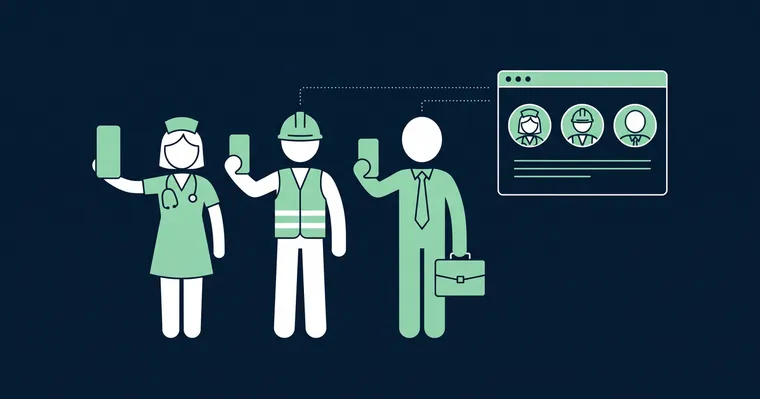
Candidates trust the people who work for you more than anything you write about yourself. That is why employee-generated content (EGC), meaning content created by your own employees, has become one of the most important building blocks of employer branding. For HR and recruitment teams, EGC in practice means short, vertical employee videos where colleagues talk about their job in their own words, published on the career page, in job postings and on social media.
Gobi Stories is a Norwegian employee video platform. We collect, edit and publish vertical 9:16 employee videos on career pages, in job postings and on social media, and with Gobi Autopilot collecting videos from employees runs automatically.
Most HR teams already know this works. The hard part is making it happen, and keeping it going after the first round. This guide is for you if you work with recruitment, employer branding or communications in an organization that is hiring. You get a clear definition of EGC, why it works in recruitment, the most common reasons EGC programs stall, and data from Gobi Autopilot showing how employees actually respond when they are invited to film.
What is employee-generated content (EGC)?
Employee-generated content is content that employees create themselves about their workplace: video, photos, posts or text that show what it is really like to work there. What matters is the messenger. The message comes from a colleague, not from the marketing department or an agency.
In recruitment and employer branding, these are the most common forms of EGC:
- Employee video: a short video where an employee answers a few questions about the job, the team and what makes the workplace worth applying to. This is the most widely used form of EGC in recruitment. See our guide to employee video.
- A day on the job: short clips that show the workday from the inside, including the tasks that never make it into the job posting.
- Social media posts: employees sharing their own experiences on LinkedIn or Instagram.
- Photos and text: blog posts, quotes and photos from everyday work.
This guide focuses on the first form, because it makes the biggest difference where candidates make their decision: on the career page and in the job posting. When we talk about EGC in recruitment, we mean vertical video in 9:16 format, filmed by employees on their own phone, in the same format candidates scroll through on social media every day.
EGC, UGC and produced video
EGC is often confused with UGC (user-generated content). UGC is created by customers and users, such as a product review or an unboxing video. EGC is created by the people who work at the company. In employer branding, EGC is what counts, because the candidate wants to know what it is like to work for you, not what it is like to be your customer.
Produced video is the third option: a film made by an agency, with a script, lighting and a film crew. It has its place, for example in a brand film, but it costs more per video and rarely feels as genuine as a colleague speaking freely.
Why EGC works in recruitment
Trust. According to the Edelman Trust Barometer, people are three times more likely to trust information about a workplace when it comes from employees rather than from the company itself. A candidate considering a job change is making a big decision. The words of a future colleague carry more weight than a tagline on the career page.
Reach. According to LinkedIn, content shared by employees gets eight times more engagement than content posted from the company’s own account. Employees have networks that look like the people you want to hire: a nurse knows other nurses, a developer knows other developers.
A realistic picture of the job. An employee video shows faces, voices and the reality of the workday. Candidates who have seen it apply with more realistic expectations, which leads to better matches. Read more about how video creates a better candidate experience.
The format candidates already use. Short, vertical video is the standard on mobile. When your career page and job postings use the same 9:16 format, you meet candidates in a flow they already know. It is one of the clearest video trends in recruitment right now.
Cost. Employees filming themselves on their phone replace film crews and editing hours. That makes it possible to have video for many roles and departments, not just for a single brand film.
Why most EGC programs stall
We have talked to hundreds of HR teams, and most of them have tried to collect employee videos on their own. The willingness is there, both in HR and among employees. Even so, many programs stop after the first round, and the reasons are almost always the same:
- Logistics take over. Someone has to pick employees, send emails, answer questions, keep track in a spreadsheet and chase those who have not delivered. In an organization with several departments and locations, it quickly turns into a part-time job.
- The bar is too high for employees. If they have to download an app, create an account or figure out what to say on their own, the recording gets postponed. And what gets postponed gets forgotten.
- Quality is all over the place. Horizontal and vertical video mixed together, poor audio, no subtitles and no shared visual identity. Videos like that rarely make it onto the career page.
- Consent is unclear. Videos of employees are personal data. Without documented consent covering where a video will be used, nobody dares to publish it.
- It becomes a one-off project. One campaign in the spring, then silence. A year later, several of the people in the videos have changed roles or left, and the content is out of date.
Notice that none of these reasons are about employees not wanting to take part. The problem is the process around them.
What the data shows: how employees respond to a video invitation
Gobi Autopilot sends personal invitations to employees and follows up automatically until the deadline. That gives a clear picture of what happens when employees are asked to film, without HR chasing anyone manually. The figures below come from invitations sent through Autopilot:
- 63.2% film and submit a video.
- 33.7% decline.
- 4.2% do not respond to the invitation at all.
- 18 days is the typical lead time from order to published video.
What does this mean if you are getting started?
Two out of three film. When the bar is low and follow-up is automatic, most people say yes. Employees are happy to talk about their job. They just need an easy way in.
A clear no is healthy. One in three declining is not a problem. It shows that participation is voluntary, and voluntary participation is the foundation of EGC. An employee who is pressured into filming looks pressured on video, and candidates notice. Make it as easy to say no as it is to say yes.
Almost nobody goes missing. The biggest risk in an EGC program is not a no, but silence: invitations sitting in inboxes until the project fizzles out. Only 4.2% end up there. Automatic reminders do the work that would otherwise be HR chasing people.
Under three weeks from order to publishing. 18 days gives employees time to film when it suits them, without the project losing momentum.
Invite more people than you need. When 63.2% film, you need to invite around 16 employees to get 10 videos. Plan for that and you avoid an extra round.
How to build an EGC program that lasts
- Start with the need. Which roles are hardest to fill, and where do candidates make their decision? Start with the roles and channels that matter most, such as the career page and the job postings for your largest hiring groups.
- Invite broadly. Pick employees from different roles, departments and locations, and with different levels of seniority. Not just the most outgoing ones. Candidates want to recognize themselves in the videos. Remember the math: around 16 invitations give you 10 videos.
- Give them questions, not a script. Three to five good questions make better videos than a script. Ask about concrete things: a typical workday, a project they are proud of, what they would tell a friend thinking about applying. Read more about storytelling in employee video.
- Keep it voluntary, and document consent. Explain where the video will be used, and collect consent before anything is published. Saying no should have no consequences.
- Lower the bar. Let employees film on their own phone, vertically in 9:16 format, with no app and no account. Show the questions on screen while they record, and let them review the recording and retake it before submitting.
- Automate follow-up. Reminders are what keep invitations from being left unanswered. Automate them, so HR does not have to track who is still missing.
- Make the recordings ready to publish. Subtitles, cuts, logo and colors give the videos a consistent look and make them work without sound. Subtitles are also essential for accessible recruitment video.
- Publish where candidates are. The career page, job postings and social media. The same video can be used in several places. See how to place employee video on your career page and in job postings.
- Make it a regular rhythm. EGC is a flow, not a campaign. Schedule a new collection round every quarter, or whenever you start a major hiring push, so the content stays current.
EGC on autopilot with Gobi
Steps 4 to 7 are what take time when HR does everything manually. That is why we built Gobi Autopilot.
You add the names and email addresses of the employees you want videos from, and set a deadline. The questions are based on Gobi’s experience of what works in employee video. From there, Autopilot takes over:
- Personal invitations: each employee gets an email invitation with a unique link straight to the recording.
- Recording in the browser: employees film with no app and no account, with the questions shown as a teleprompter on screen.
- Consent in the same flow: consent for use on career pages, job postings, websites and social media is collected as part of the recording.
- Automatic reminders: anyone who has not filmed gets a friendly reminder until the deadline.
- Draft before submitting: employees can review their recording and retake it before submitting.
- Fully edited video: you approve the drafts, and Gobi edits the videos with subtitles, cuts, logo and colors.
The result is the data above: two out of three invited employees film, and the typical lead time is 18 days from order to published video. Read more about how Autopilot works, or see what it is like for the employees who are invited.
Get started with EGC
Employee-generated content works because candidates trust colleagues, and employee willingness is not the bottleneck. The process is. When invitations, reminders, consent and editing run on their own, EGC becomes a permanent part of recruitment instead of a project that stops after the first round.
Want to see how employee stories are used in practice? See employee stories as a use case, or read more about employee video, recruitment video and employer branding video.
Frequently asked questions
What is employee-generated content (EGC)? +
Employee-generated content (EGC) is content that employees create themselves about their workplace, such as video, photos or social media posts. In recruitment and employer branding, the most important form is short, vertical employee videos in 9:16 format where employees talk about their job in their own words. EGC is more credible than content from the company itself, because the messenger is a colleague.
What is the difference between EGC and UGC? +
UGC (user-generated content) is created by customers and users, while EGC is created by employees. In employer branding, EGC is what matters, because candidates want to know what it is like to work at the company, not what it is like to be a customer.
How many employees should we invite to get enough videos? +
Data from Gobi Autopilot shows that 63.2% of invited employees film and submit a video. If you want 10 employee videos, invite around 16 employees.
What if employees do not want to film? +
Keep it voluntary. In Gobi Autopilot, 33.7% of invited employees decline, and that is perfectly normal. Voluntary participation is what makes EGC credible. Invite more people instead, and spread the invitations across roles, departments and locations.
Do we need consent from employees to use the videos? +
Yes. A video of an employee is personal data, and you should have documented consent covering where the video will be used before you publish it. In Gobi Autopilot, consent is collected automatically as part of the recording and covers career pages, job postings, websites and social media.
How long does it take to collect employee videos? +
With Gobi Autopilot, the typical lead time is 18 days from order to published video. That gives employees time to film when it suits them, with automatic reminders until the deadline.