
Headly
Integration guide
Add stories to job postings
Show employee videos directly in Headly job postings using the built-in Stories module.
Create a story in Gobi Studio
Go to studio.gobistories.com and log in. Create a new story, upload short videos and/or images, and publish it.
Copy the story ID
You'll find the story ID after "ID:" next to the title at the top of the editor in Gobi Studio — click it to copy. You can also use "Copy ID" in the story card's menu under "Stories".
Go to your company profile
Log in to Headly, click "Companies" in the top menu and find your company profile.
Select "Positions"
From the company profile, click "Positions" in the left sidebar.
Edit the position
Find the position you want to add stories to and open it for editing.
Enable the Stories module
In the section list on the left, enable the "Stories" module by toggling the switch.
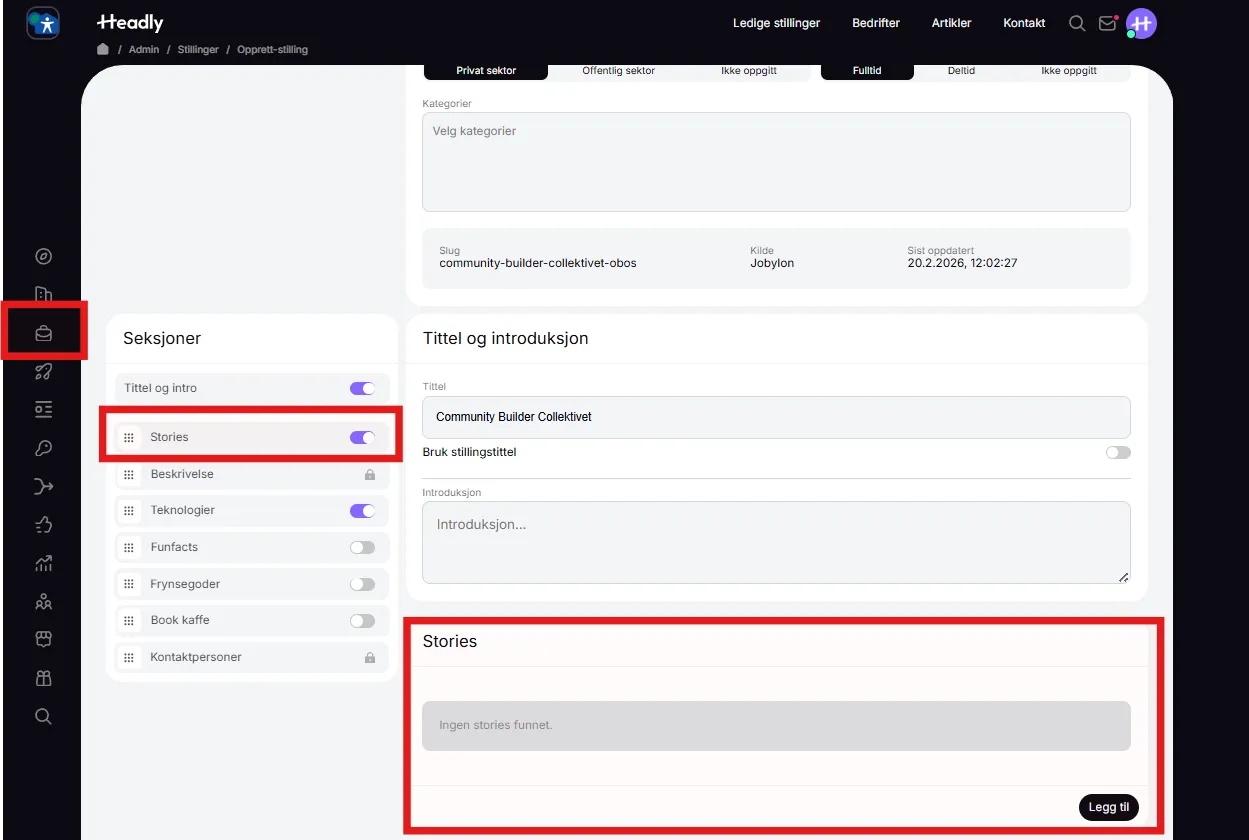
Add story ID
In the Stories section that appears, click "Add" and paste the story ID from Gobi Studio. Save the changes.
Did it work?
Let us know if you got it working, or if you need some help.