
Headly
Integration guide
approx. 5 min 6 steps
Add stories to your career page
Show employee videos on your company profile in Headly, so visitors see them right away.
1
Create a story in Gobi Studio
Go to studio.gobistories.com and log in. Create a new story, upload short videos and/or images, and publish it.
2
Copy the story ID
You'll find the story ID after "ID:" next to the title at the top of the editor in Gobi Studio — click it to copy. You can also use "Copy ID" in the story card's menu under "Stories".
💡 The story ID is the short code that identifies your story, e.g. "23th6".
3
Go to your company profile
Log in to Headly, click "Companies" in the top menu and find your company profile.
4
Manage the company profile
Click "Manage" to open the editing view for your company profile.
5
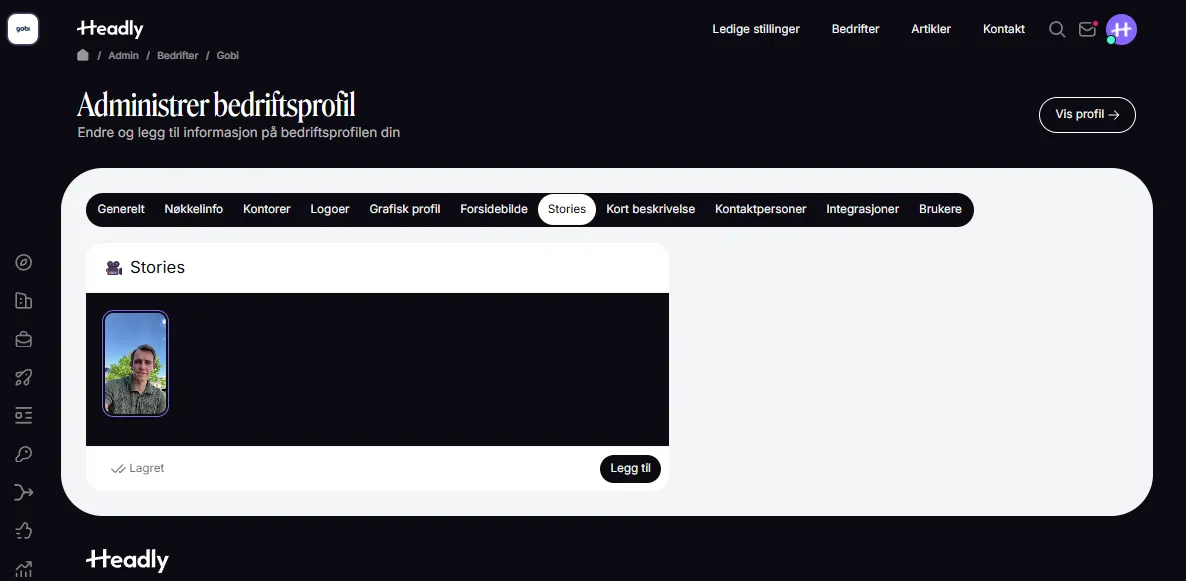
Go to the Stories tab
Click the "Stories" tab in the profile editor.
6
Add story
Click "Add" and paste the story ID from Gobi Studio. Save the changes.
🎉
Did it work?
Let us know if you got it working, or if you need some help.